Welcome to EPower Maps
EPower Maps is a field data-collection app for electrical infrastructure. Use it on Android and iOS to capture pole GPS, attach accessories, manage cable and transformer catalogs, sync with the server, and export a KMZ map of everything you collected to Google Earth — even when offline.
What this guide covers
Overview & field workflow
Admin catalog
Setup & extras
Appendix
Before you start
- Install the app on Android (API 21+) or iOS.
- Grant Location permission (required) plus Camera (for QR tenant scan), Microphone (voice input for AI ERA), and Biometric (optional).
- Register your organisation by scanning the tenant QR code (Settings → Manage Tenants → Scan QR) — see step 14.
- Run an initial sync (Communication tab → Import Data) to pull your catalog from the server — see step 4.
- You're ready: the app opens to Dashboard (step 1). Switch to the Collect tab to start capturing poles (step 2).
1. Dashboard & Analysis
- Counts are server-authoritative:
GET /DashboardreturnsAccessoryCount,PackageCount,PlaceCount,PoleCount,StyleCount,CableStyleCount,TransformerStyleCount,TransformerCount,CollectedCount,NotCollectedCount. - Overview card: linear bar (collected vs not-collected) — non-collected slice rendered in red.
- Interactive donut chart: tap a slice → swaps the body chart / tab; not a static image.
- Pie chart (
fl_chart) of collected vs. uncollected poles + per-area breakdown. - Resilient: each
dao.queryCountwrapped insafeCount(); on failure shows error UI with retry button instead of spinning forever. - Lucide icons used across new admin tiles (cable, line-style, transformer-style) for visual consistency with existing entities.
The Dashboard screen
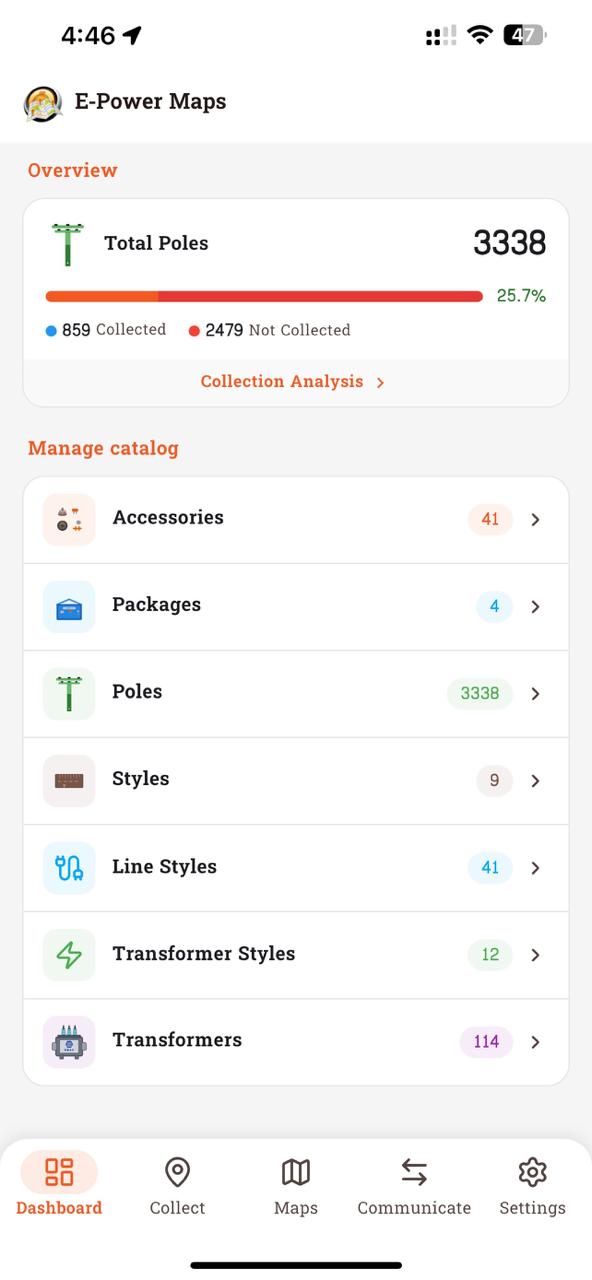
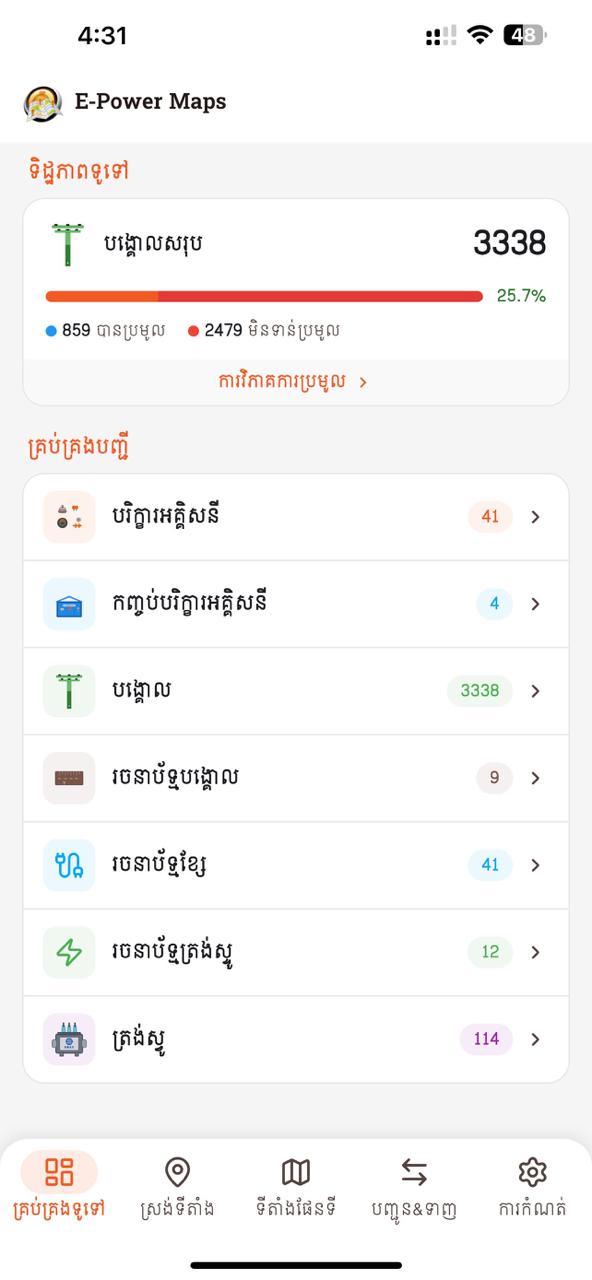
- 1Overview card — total Places, collected vs. pending counts, and a thin progress bar. Tap to drill into the Analysis charts.
- 2Manage Catalog — coloured icon tiles for each catalog (Accessories, Packages, Places, Pole Style, Transformers, Cable Style, Transformer Style, Cable, Distribution Method). Counts pulled from
/Dashboard. - 3Pull-to-refresh anywhere on the page to fetch fresh counts.
- 4Dashboard is the first tab and the post-splash landing screen.
Collection Analysis — drill-down
Tap the Overview card on Dashboard to open Collection Analysis: a progress bar, donut chart of the collected-vs-not-collected split, three count tiles, and a tab list of every pole grouped by area.
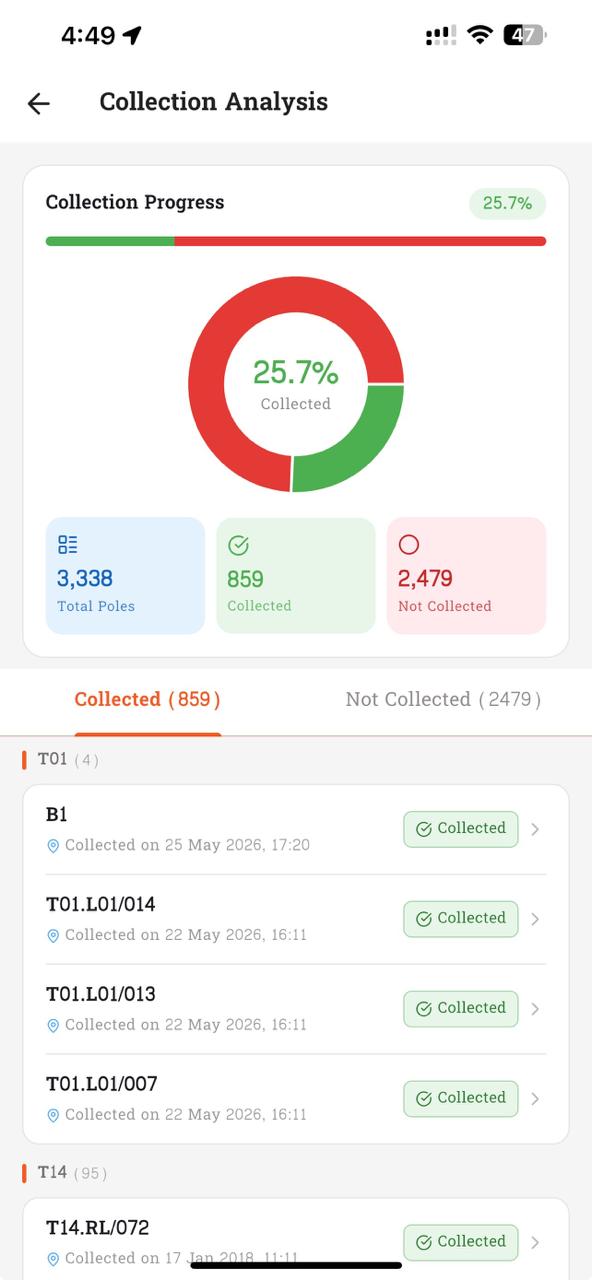
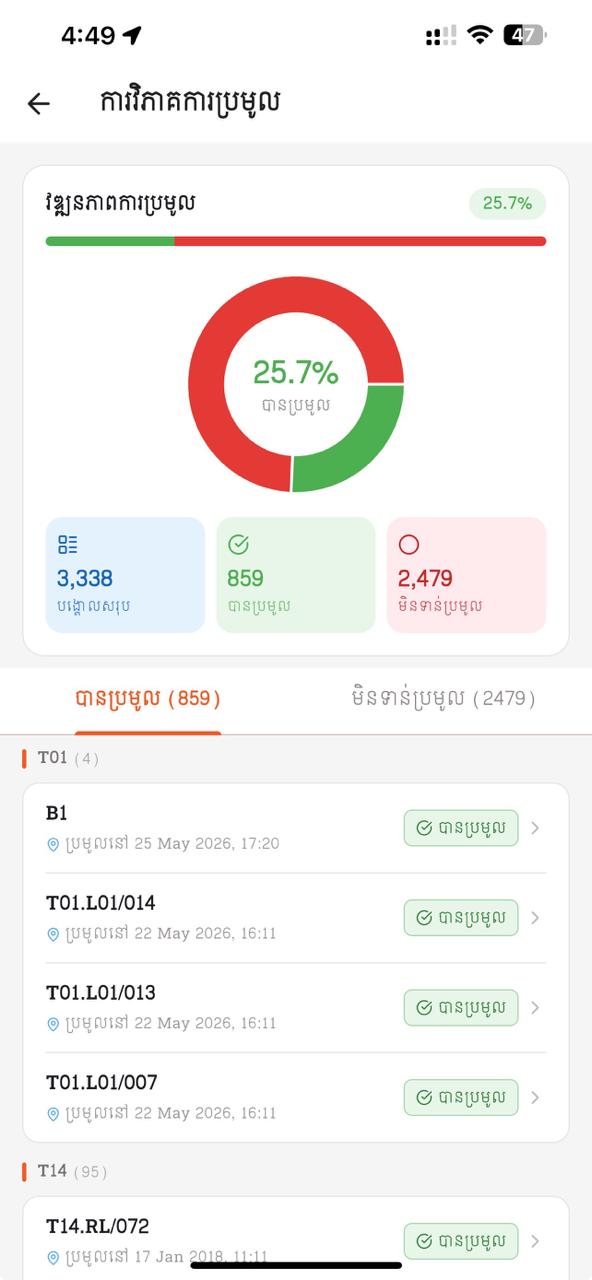
- 1Collection Progress bar — green = collected portion, red = not-collected. The percentage chip on the right mirrors the donut centre.
- 2Donut chart — interactive. Tap a slice to switch the focus between the Collected and Not-Collected lists below.
- 3Three count tiles — Total Poles / Collected (green tick) / Not Collected (red ring). Numbers come straight from
/Dashboard. - 4Tabs — "Collected (n)" and "Not Collected (n)". The active tab is underlined in orange.
- 5Pole list — grouped by area (T01, T14 …). Each row shows pole code, collection date, and a green "Collected" pill on the Collected tab; tap a row to open the pole's Place detail.
- Counts match the totals per admin list.
- After a new collection, analysis chart refreshes within the same session.
2. Collect — Capturing a pole
The core workflow used by field technicians to capture a pole's GPS, style, ownership, and accessories.
- Open Collect — the second tab of the bottom navigation. (The first is Dashboard; see chapter 1.)
- Place picker with search + "Add New Pole" inline sheet.
- New pole uses Place detail page (same ALL-CAPS + duplicate check + distinct-area picker).
- GPS via
geolocatorstream; distinct error states (service off / permission denied / forever / stream error) each with Snackbar + Settings shortcut. - Same visual cues retained: collected poles stop live updates and show stored coords in primary color; live updates render in the theme accent color. Accuracy figure shown in real time.
- Same style picker + ownership toggle; collected-vs-live color cue retained.
- Same accessory + package selection; quantities editable inline.
- Save persists locally and syncs to API — or queues to pending-sync when offline.
- Prev/Next retained. Multi-tenant aware: no tenant → writes to default DB.
The Collect screen
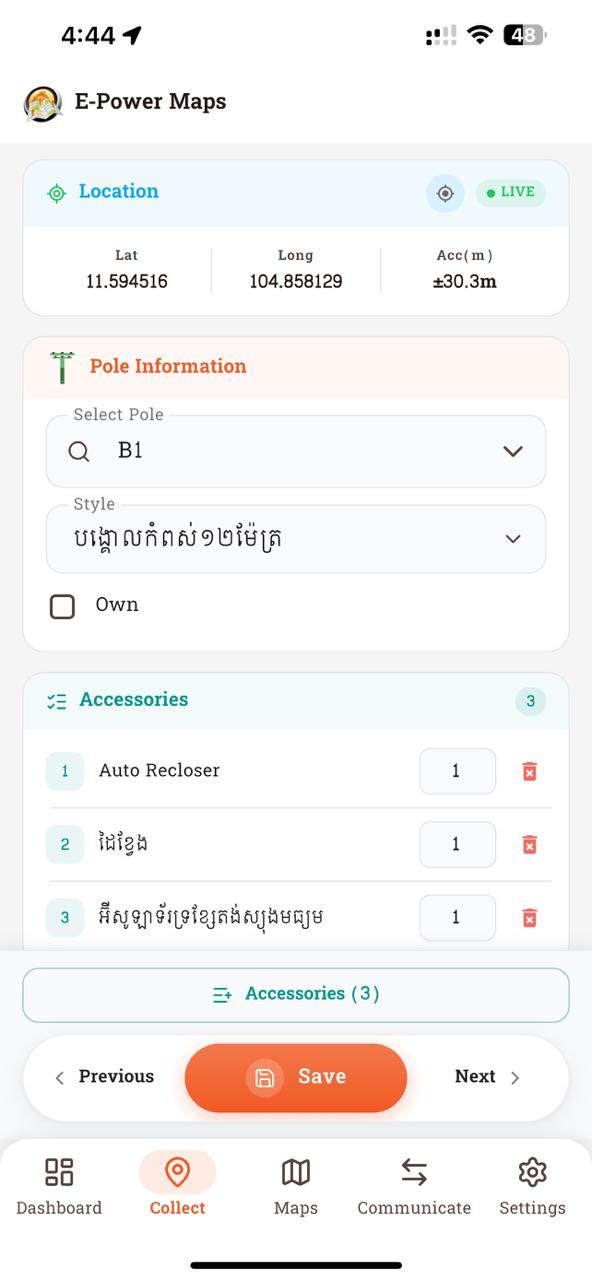
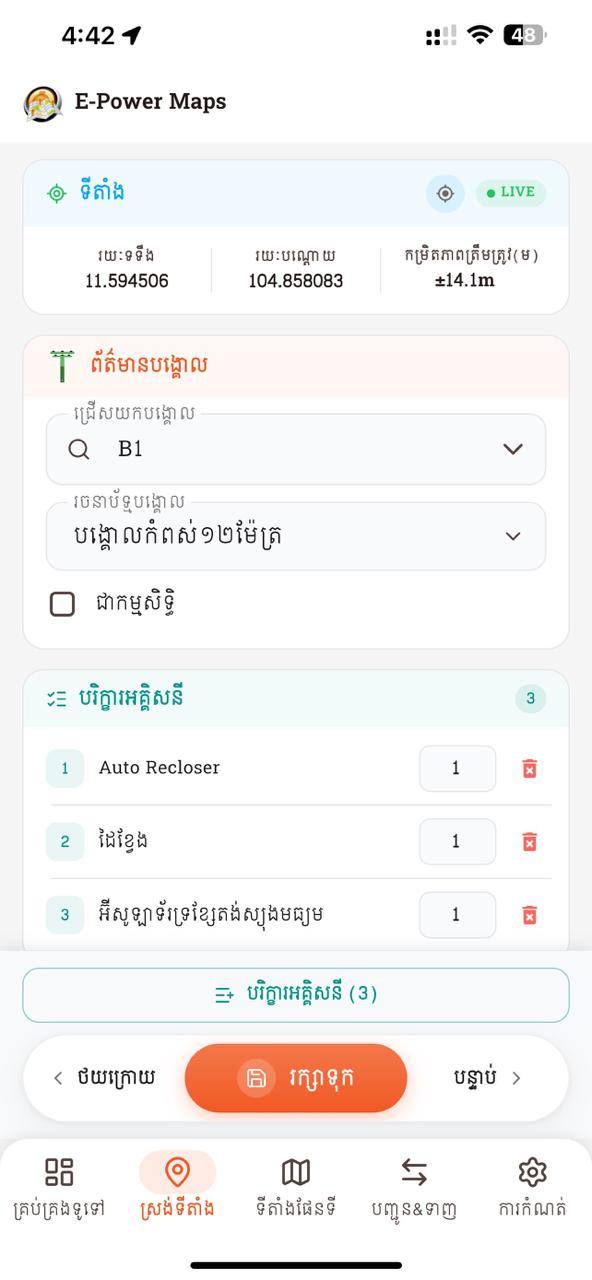
- 1Location card — live latitude / longitude / accuracy. Green LIVE badge while the GPS stream is active; tap the refresh icon to force a re-read.
- 2Pole Information card — search-pick a pole (here:
B1), then pick its style (e.g. បង្គោលកំពស់១២ម៉ែត្រ). Tick "Own" if the pole belongs to E-Power. - 3Accessories card — each row shows index chip + name + qty input + red trash icon to remove. Header pill shows the live count.
- 4Sticky bottom bar — outlined accessory-count button above a Prev / Save (orange pill) / Next row. Save persists locally and posts when online; queues to pending-sync when offline.
- 5Bottom nav — Dashboard / Collect (active) / Maps / Communication / Settings. Tap Maps to launch Google Earth from the latest data.
- Open Collect; list orders by area then pole name.
- Type a partial name → only matching poles appear; "Add New Pole" entry shown.
- Create new pole with duplicate name → rejected with required/duplicate error.
- Capture GPS for a fresh pole → values live-update; accuracy shown.
- Reopen collected pole → live updates stop; stored coords shown in primary color.
- GPS color cue: poor signal shows coords in red and Save is blocked; good signal turns them white and Save is enabled.
- Add one accessory + apply one package → quantities correct; remove = soft-delete.
- Save → record persists, advances to next pole, syncs or queues.
- Toggle offline → save succeeds; go online → record posts automatically.
3. Maps / KMZ Export
The KMZ generator has been rewritten end-to-end: it composes Google Earth output entirely from current PoleStyle / CableStyle catalog data — no more hard-coded blue/red icons. Pole markers are tinted from a single white outline icon, cables come from real TblCablePlace records, and a LOD-swap keeps icons readable from continent zoom down to street level.
- KMZ generated inside the app from collected data using the
archivepackage. - Per-PoleStyle
<Style>blocks:ic_pole_outline.pngis tinted via<IconStyle><color>channel multiplication; scaled byicon_scale. - LOD-swap: two Placemarks per pole (far & near) inside a
<Folder>withcheckHideChildren, swapping at 300 pixels — one entry per pole in the Earth list. - Cables drawn as LineStrings: startPoint → ordered details → endPoint (no Region gating, so long lines don't disappear when midpoint goes off-screen).
- Cable color + width from CableStyle (
LineColor,LineWidth,Diameter). - Transformer placemarks render at the linked Place's coordinates (since
tbl_transformerhas no own coords, onlyplace_id). - Color encoding: SQLite stores AARRGGBB (Flutter
Color.toARGB32);_argbHexToKmlColorswaps R↔B to AABBGGRR for KML. - Online refresh: when reachable,
openGoogleEarth()calls_syncAllDataForMaps()to pull the latest places/transformers/cables before rendering. - Offline fallback: reads cached
tbl_place/tbl_transformer/tbl_cable+tbl_cable_detail. - Bundled assets in KMZ:
ic_pole_outline.png+ fallbackic_pole_blue/red+ transformer icon.
Layer-by-layer KMZ structure
maps.kmz (zip)
├── doc.kml
│   ├── <Style id="poleStyle_<id>">        ← per PoleStyle (tinted ic_pole_outline)
│   ├── <Style id="poleStyleNear_<id>">    ← same icon at ~35 % scale for near zoom
│   ├── <Style id="cableStyle_<id>">       ← per CableStyle (LineColor + LineWidth)
│   ├── <Style id="polePairFolder">        ← ListStyle: checkHideChildren (1 row / pole)
│   ├── <Folder name="Poles">
│   │   └── <Folder> per pole (#polePairFolder)
│   │       ├── <Placemark> far variant — maxLodPixels=300
│   │       └── <Placemark> near variant — minLodPixels=300
│   ├── <Folder name="Cables">
│   │   └── <Placemark> per cable — LineString(start → details[order] → end)
│   └── <Folder name="Transformers">
│       └── <Placemark> per transformer at its place_id's lat/lng
└── icons/
    ├── ic_pole_outline.png    ← single white-fill icon, tinted at render time
    ├── ic_pole_blue.png       ← fallback when no PoleStyle assigned
    ├── ic_pole_red.png        ← fallback for "not collected"
    └── ic_transformer.png
clamp(0.7, farScale) crashes when admin sets iconScale < 0.7 — code uses plain if-conditionals instead. (b) Near scale floor is 0.7 except when farScale is already smaller. (c) PoleStyles with unset iconScale render at 0× until a value is saved — defaults to 2.5 only when value is 0 or absent.
- Generated KMZ opens correctly in Google Earth / Pro.
- Coordinates on map match those captured in Collect.
- Each pole rendered in its PoleStyle color + scale.
- Zoom in from country level → icons shrink at ~300 px boundary; zoom further to street → labels appear.
- Pole list (left panel in Earth) shows one row per pole — no duplicate near/far entries.
- Cable lines follow real
start → details (ordered) → endpath; long cables stay visible when midpoint is off-screen. - Cable color + width reflect their CableStyle.
- Transformers appear at the host pole's location with name label.
- Re-open Maps while online → newly collected places appear; offline → cached snapshot still opens.
4. Communication — Data Sync
The biggest architectural change: USB/TCP socket has been replaced with a REST API, and offline + auto-sync are first-class.
- HTTPS REST API via Dio. Base URL overridable via Developer Mode.
- Export to server:
POST /Sync?type=import— bulk JSON payload (style, accessory, package, packageDetail, place, placeDetail, transformer).is_newflag drives server INSERT vs UPDATE. - Import from server:
POST /Sync?type=export→_importServerData()wipes + reinserts each catalog table; pending-sync queue cleared (server is now authoritative). - DistributionMethod auto-refresh:
importFromServer()also calls/Lookup/Distributionsand replacestbl_distribution_methodso the LineStyle picker stays offline-usable. - Per-entity REST writes during Collect/Admin:
/Accessory,/Place,/Place/Collect,/Pole,/Style,/CableStyle,/TransformerStyle,/Cable,/Transformer,/Package. HeaderApp-Id= tenant. - Pending-sync queue (
tbl_pending_sync) + auto-sync viaConnectivityService. Triggers: connectivity restore, 3-min periodic, app resume. - Connectivity treats any non-
noneresult as online (wifi/mobile/ethernet/vpn/other) — previously VPN was misread as offline. - SyncBloc phases:
idle → exporting → importing → completed | failed. - Every attempt logged to
tbl_sync_historywith type/item-count/status/error. - Maps export piggy-backs:
openGoogleEarth()runs a silent sync first when online so the KMZ reflects fresh server state.
The Communication screen
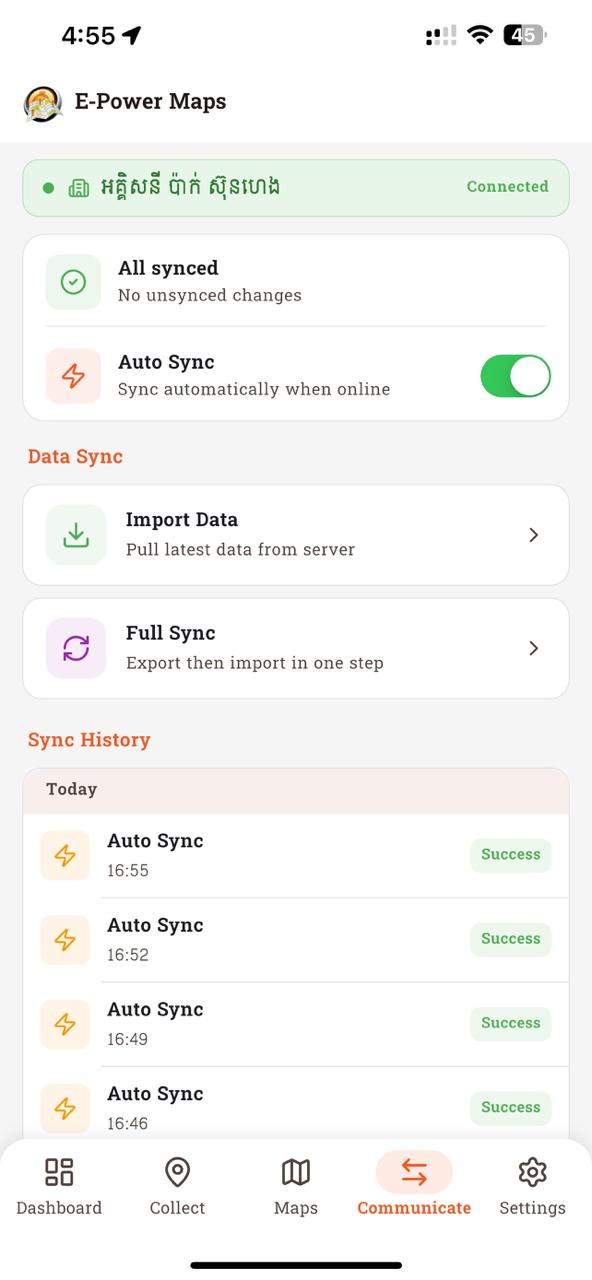
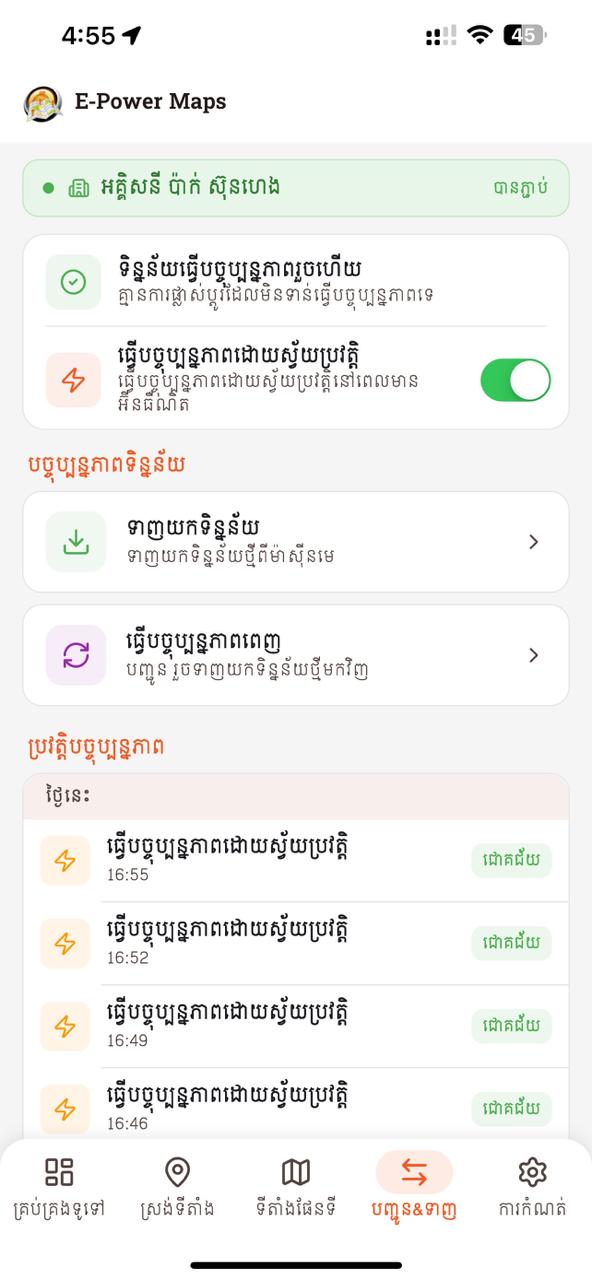
- 1Tenant chip — green when an organisation is registered and reachable (e.g. អត្តសញ្ញាប័ណ្ណ ស៊ីនហេង · Connected). If empty, prompts you to register one.
- 2Sync status card — shows "All synced" (no pending) or "n pending changes" with a Sync button. The Auto Sync toggle controls whether the app uploads automatically when connectivity returns.
- 3Data Sync — two action tiles: Import Data (pull latest catalog from server, also refreshes Distribution Methods) and Full Sync (export then import in one run).
- 4Sync History — grouped by date (Today / Yesterday / earlier). Each row shows the sync type ("Auto Sync" / "Full Sync" / "Import"), the time, and a green Success / red Failed pill.
- 5Bottom nav — Communicate tab active (orange pill background). Tap any tab to switch instantly.
- Full Sync → pulls latest catalogs; posts unsynced collections.
- Import-only run → catalogs refresh, in-progress collections untouched.
- Offline create → Pending queue; online → auto-sync, Sync History shows success.
- Force 4xx/5xx → Sync History captures error; queue keeps item for retry.
- KMZ export produces a valid file that opens in Google Earth.
5. Accessories
- Full CRUD with pagination, search, selection mode.
- Add enabled — writes hit
/Accessoryendpoint when online. - Offline creates queue to
tbl_pending_sync; auto-flush on reconnect. - Same soft-delete semantics (
is_active).
The Accessories screen
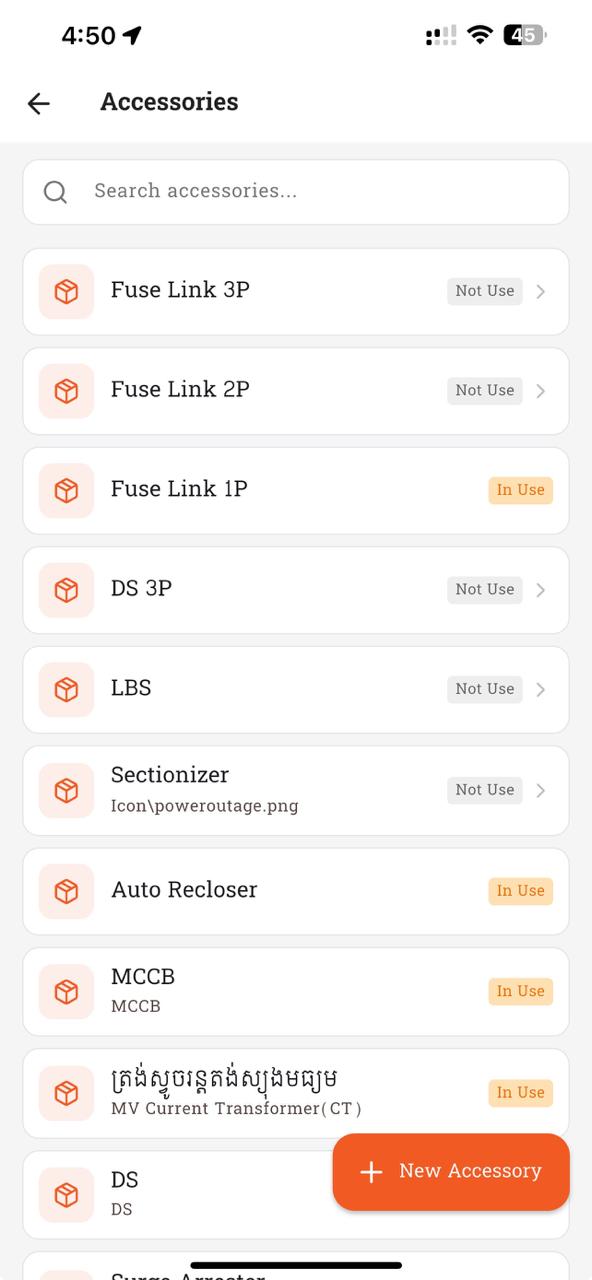
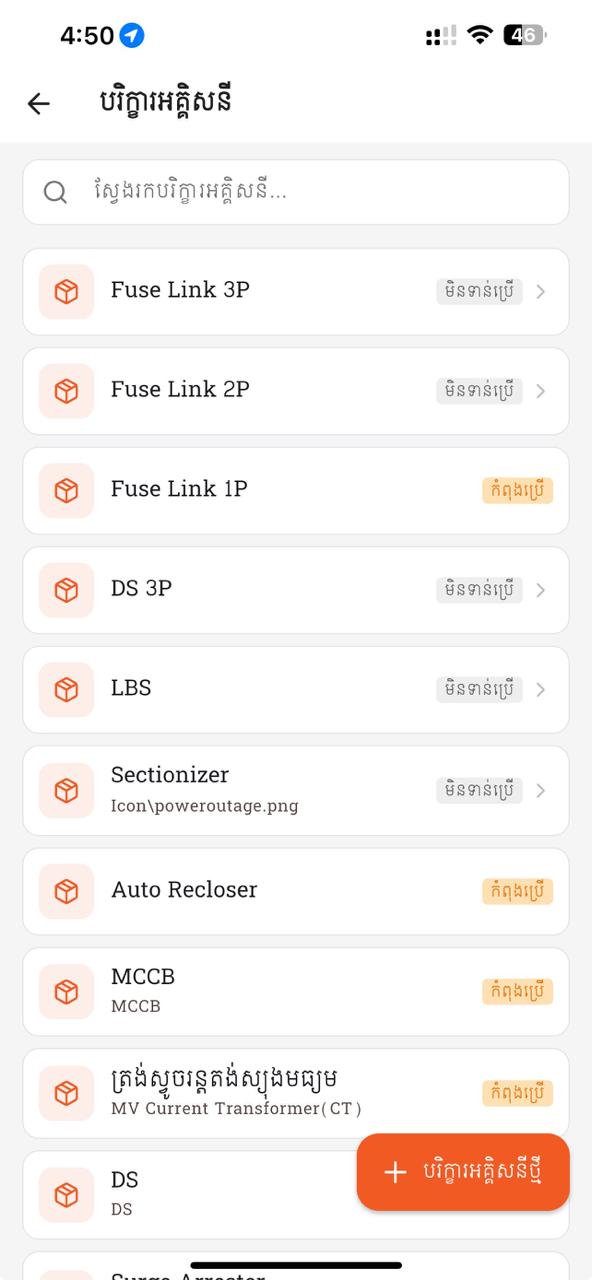
- 1Search box at the top — type to filter accessories by name (e.g.
Fuse,MCCB,Auto Recloser). - 2Each row shows the accessory icon, name, optional sub-label (image path or code), and a status pill: gray "Not Use" or orange "In Use". The pill comes from the server — an accessory is "In Use" when at least one active Place or Package references it.
- 3Tap any row to open the detail page (edit name / note, soft-delete). Long-press to enter selection mode for batch actions.
- 4Orange "+ New Accessory" floating button at bottom-right opens a sheet to create one. Saves go straight to
/Accessorywhen online, or queue offline.
- Create a new accessory → appears in list, posted to API, visible on web.
- Edit existing → name/note changes persist; round-trip to server.
- Soft-delete → hidden from list but retained in DB (
is_active = 0). - Offline create → queued; online → queued item syncs.
6. Packages
- Same name + accessory rows + quantity model.
- Same cascade semantics via
PackageRepository. - Applying a package in Collect adds all PackageDetail rows as PlaceDetail (skipping duplicates).
- Create package with 3 accessories + quantities → Collect apply adds same 3 PlaceDetail rows.
- Edit: add one, remove one, change qty → next apply reflects changes.
7. Places
- Same ordering rule.
- Same uppercase + duplicate-name enforcement.
- Distinct-area picker presented as a sheet.
- New place with lowercase input → saved as UPPERCASE.
- Duplicate pole name → rejected with same-name error.
- Area picker suggests existing distinct areas.
8. Pole Style
- Full CRUD enabled.
- is_active added → supports soft-delete for styles as well.
- PoleStyle controls KMZ output:
line_color(AARRGGBB),line_width,icon_scale,altitude,label_color,label_scale,label_opacity. Re-labelled in UI to "Pole Color / Size" (line_color/widthcontrol the pole MARKER, not the cable line). - Save validation: only
name,altitude,line_color, andline_widthare required.
- Create / edit / delete style; server reflects the change.
- Edit a style → save → POST/PUT actually fires (verify with network log).
- Change Pole Color → KMZ pole markers in Google Earth reflect the new color.
- Change
icon_scale→ marker visibly larger/smaller at the same zoom.
9. Transformers
- Full CRUD enabled.
- Pole association (
place_id) preserved.
- Create transformer linked to a pole; pole association persisted.
- Edit / delete transformer; server reflects change.
14. Multi-Tenant ➕
- Register via QR scan (
mobile_scanner); list persisted in SharedPreferences. - Per-tenant SQLite file:
MobileDB_<tenantId>.db. - Switching re-opens DB and updates
App-Idheader on all future requests. - All blocs reload after tenant switch; rename / remove supported.
Screen layout — Tenant management
- 1Current tenant card at top with "Disconnect" button (red outline)
- 2Two outline buttons: Scan QR (camera) + Manual (keyboard). Manual opens a bottom sheet with name/ID fields.
- 3Active tenant — 2px orange border + "Active" pill + edit icon. Others are tappable rows with chevron, swipe-left to delete.
- Register Tenant A via QR → data isolated in DB_A.
- Register Tenant B → DB_B separate and empty of A's records.
- Switch A ↔ B → lists repopulate correctly, no cross-contamination.
- Rename / remove tenant → persists across app restart.
15. Settings ➕
- Language: Khmer / English (Khmer is default).
- Theme: Light / Dark / System.
- Primary color picker + font family (7 Khmer fonts) + font size.
- App version displayed; 7 taps on version unlocks Developer Mode.
Screen layout — Settings
- 1Collapsing hero header (220 → 56px) with app icon, name, version badge over an orange gradient
- 2Theme Mode: 3 mini-preview cards (Light / Dark / System). Selected card has 2px orange border + checkmark badge.
- 3Primary color tile opens a bottom sheet with 12 swatches; Font Family opens another sheet with font previews
- 4Font Size is a 3-way segmented control (S / M / L), selected has solid orange background
- 5Version badge in the header is the 7-tap trigger for Developer Mode
- Change language → UI re-renders immediately across all tabs.
- Toggle theme; confirm on admin / communication / collect pages.
- Swap font + size; Khmer rendering remains correct.
- 7-tap gesture + year PIN unlocks Developer page.
16. Developer Mode ➕
- Gated by 7 taps on version + current-year PIN (e.g. 2026).
- PIN entry is now a full-screen page (not a dialog): 4-digit dot indicator + numeric keypad + haptic feedback on wrong entry. Replaces the old
AlertDialog. - Add / activate alternative API base URLs (staging / prod / custom). Persisted in
tbl_dev_base_url. - Toggle biometric authentication (currently commented out behind a TODO —
local_authwired but feature gated off).
- Unlock → override base URL → all requests use the new URL after save.
- Enable biometric → next cold start prompts for fingerprint / Face ID.
17. AI ERA Chat & Voice ➕
- In-app AI chat assistant.
- Speech-to-text input via
speech_to_text.
- Open AI ERA → chat loads; send message → response rendered.
- Voice input transcribes Khmer / English correctly.
10. Cable Style ➕
Catalog vertical added so admins can define cable appearance (color, width, diameter) and electrical attributes (distribution method, shielded, underground). Backend names this entity CableStyle; the mobile UI keeps the user-facing "Line Style" wording, with only the wire contract using the backend name.
- Routes:
/admin/line-styles(list) +/admin/line-styles/:id(detail). - Form fields:
styleName,lineColor(AARRGGBB picker),lineWidth(sheet picker 0.5/1/1.5/2/2.5/3),diameter,altitude,distributionId(DistributionMethod picker — REQUIRED *),isUnderground,isShielded. - DistributionMethod picker is backed by
tbl_distribution_method(three-layer cache, see 3.18). - REST:
/CableStyle(GET list/byId, POST add, PUT update, DELETE list). HeaderApp-Id= tenant. - Backend marks
IsInused = ANY TblCablePlace.StyleId. Delete rejected when in-use. - DB-side:
tbl_line_style(dbVersion 17) — id, name, line_color, line_width, diameter, altitude, distribution_id, is_underground, is_shielded, is_active, is_new. - Drives KMZ cable rendering:
cableStyle_<id>Style block (LineColor + LineWidth) applied to each cable LineString. - Backend orders DESC; mobile list shows IsInused chip on each row.
- Create cable style → list shows new entry; KMZ cable lines using it render with the chosen color/width.
- Distribution-method field shows red
*and rejects save when empty. - Mark IsShielded → persisted; verify on server side.
- Delete a cable style currently referenced by a cable → server rejects with in-use error; mobile shows snackbar.
- Admin overview tile shows Cable Style count from
/Dashboard.
11. Transformer Style ➕
Catalog vertical for transformer marker styling (icon, label color, scale, opacity). Mirrors PoleStyle but for transformers. Backend route /TransformerStyle. Currently IsInused is hard-coded false server-side — TblTransformer has no StyleId FK yet.
- Routes:
/admin/transformer-styles+/admin/transformer-styles/:id. - Form fields:
styleName,iconHref,iconScale,altitude,labelColor,labelScale,labelOpacity. No "In link" / image upload column (mobile cannot upload icons). - REST:
/TransformerStyle. Backend orders DESC.IsInusedhard-coded false (FK pending). - DB-side:
tbl_transformer_style(dbVersion 18). - Admin tile + count + Lucide icon.
- Admin menu → Transformer Style → list opens (no 404).
- Create / edit / delete; counts in Admin overview update.
- Save with default values succeeds — no "required field" false-negative.
12. Cable + Details ➕
A new read-side catalog so the KMZ generator draws cable lines from real, ordered records instead of inferring connectivity via nearest-neighbor. Each cable has a start place, end place, and ordered intermediate stops (details). The mobile keeps no dedicated CRUD UI — admins create these from the desktop / web; mobile only caches them for offline KMZ generation.
- REST:
GET /Cable(list with details inlined),GET /Cable/{id}, POST/PUT/DELETE. - Backend single-query detail hydration via
GroupByonTblCablePlaces→ no N+1; details ordered byorder_id. - DB-side:
tbl_cable+tbl_cable_detail(dbVersion 19). - Mobile sync strategy: wipe + reinsert on each refresh (cable count is small; diff would be more code than value).
- Consumed by
lib/core/utils/maps_launcher.dartto walkstart → details[order_id] → endand emit one KMZLineStringper cable. - Each cable references a CableStyle (3.15) which supplies its color/width in KMZ.
- Server has a cable with 3 ordered details A → B → C → D → KMZ draws 3 segments in that order.
- No nearest-neighbor lines appear when an admin pole has no real cable record.
- Offline KMZ uses cached
tbl_cable; cable lines still render.
3.18 Distribution Method ➕
A small, read-only enum backing the CableStyle distribution picker. Designed to stay offline-usable after the first online fetch — so an admin can still pick "underground / overhead / …" in the field. Persisted via a three-layer cache.
DistributionMethodRepository.getAll({refresh})
  │
  ├─ Layer 1 ─ in-memory _cache (List<DistributionMethodModel>?)
  │            ↳ cheap repeat lookups within a session
  │
  ├─ Layer 2 ─ SQLite tbl_distribution_method  (dbVersion 20)
  │            ↳ survives app restarts → offline launches resolve names
  │
  └─ Layer 3 ─ GET /Lookup/Distributions  (read-only enum)
               ↳ source of truth; refreshed during EMapSyncRepository.importFromServer()
- No dedicated CRUD UI — only consumed by the LineStyle/CableStyle picker.
- RepositoryFactory.distributionMethod returns local-only repo when no tenant; tenant-aware repo (with api + connectivity) when a tenant is active.
- getAll({refresh}) flow: in-memory cache → online fetch + DB swap on success → DB fallback on offline / failed network.
- On import sync:
EMapSyncRepository.importFromServer()callsgetAll(refresh: true)inside a try/catch so the bulk sync isn't poisoned by a Lookup failure. - DB swap is wipe-and-insert (enum tiny, rarely changes; diff is more code than value).
- Backend:
GET /v2/EPowerMap/Lookup/Distributions→List<MapLookupItem>{Id, Code, Name}, ordered byOrderASC.
- First-run online: open CableStyle form → distribution picker lists server values.
- Disconnect network → reopen form → picker still works (values from
tbl_distribution_method). - Run a sync import while online →
tbl_distribution_methodrefreshed (verify via debug log🟫 [DistMethodRepo.getAll]). - Lookup endpoint returns 5xx → sync import still completes (catch logs
⚠️ distribution methods refresh failedbut proceeds).
A. Data Model
SQLite schema is at dbVersion = 20 (MobileDB or MobileDB_<tenantId>.db for multi-tenant). Each version adds catalog / cache tables: v17 = tbl_line_style, v18 = tbl_transformer_style, v19 = tbl_cable + tbl_cable_detail, v20 = tbl_distribution_method.
| Table | Flutter (v20) | Notes |
|---|---|---|
tbl_accessory | Same | — |
tbl_style | + is_active, line_color, line_width, icon_scale, altitude, label_color, label_scale, label_opacity | Soft-delete + KMZ rendering attrs |
tbl_package | Same | — |
tbl_package_detail | Same | — |
tbl_place | Same | — |
tbl_place_detail | Same | — |
tbl_pole | ➕ pole roster (pole_code, area_code, area_name, …) | Authoritative pole master |
tbl_transformer | Same (place_id linkage retained) | No own coords; rendered at linked pole |
tbl_line_style | ➕ id, name, line_color, line_width, diameter, altitude, distribution_id, is_underground, is_shielded, is_active, is_new | dbVersion 17 — CableStyle on the wire |
tbl_transformer_style | ➕ id, name, icon_href, icon_scale, altitude, label_color, label_scale, label_opacity, is_active | dbVersion 18 |
tbl_cable | ➕ id, style_id, start_point_id, end_point_id, phase_id, distribution_id, … | dbVersion 19 — KMZ data source |
tbl_cable_detail | ➕ id, cable_id, place_id, order_id | dbVersion 19 — ordered stops along a cable |
tbl_distribution_method | ➕ id, code, name | dbVersion 20 — 3-layer cache for the LineStyle picker |
tbl_pending_sync | ➕ Offline-write queue | Offline support |
tbl_sync_history | ➕ Audit log per sync attempt | Observability |
tbl_ai_chat_session | ➕ session id, title, last_message_at | AI ERA chat |
tbl_ai_chat_message | ➕ id, session_id, role, content, timestamp | AI ERA chat |
tbl_dev_base_url | ➕ Configurable API URLs | Dev tooling |
Soft-delete semantics (is_active = 0) retained for every catalog table. Server is source of truth — sync import wipes + reinserts catalog tables; ad-hoc writes go via per-entity REST endpoints and pending-sync queue.
B. Architecture overview
GoRouter shell (4 bottom tabs)
  ├─ CollectPage
  ├─ AdminPage (hub)
  │   ├─ Accessory / Package / Place
  │   ├─ Pole Style / Transformer
  │   ├─ Cable Style / Transformer Style
  │   ├─ Cable / Distribution Method
  │   └─ Analysis (Dashboard)
  ├─ CommunicationPage
  └─ SettingsPage

Pushed above the shell (root-level pages):
  Tenant · Developer · AI ERA · Analysis

Feature modules:
  UI → Bloc → Repository → BaseDao + ApiService

Core:
  tenant/ (per-tenant DB + App-Id header)
  network/ (Dio + interceptors + ConnectivityService)
  data/   (pending-sync queue, sync history, distribution method cache)
  database/ (sqflite + BaseDao singleton)
  theme/, l10n/  (Material 3, en + km)
- State: fragments + manual listeners → BLoC with typed Events/States.
- DB: GreenDAO → SQLite via
sqflite+BaseDaosingleton. - Networking: raw Socket → Dio client with App-Id + auth interceptors.
- Connectivity: ConnectivityService treats any non-
nonetransport (wifi/mobile/ethernet/vpn/other) as online; previously VPN was misread as offline and forced the offline-queue path. - Caching: three-layer cache pattern (in-memory → SQLite → API) introduced for read-only lookups; first applied to DistributionMethod, designed to extend to other rarely-changing enums.
- DI: manual in APP subclass →
RepositoryFactory, constructor-injected and tenant-aware: returns local-only repos when no tenant is active, fully-wired (API + connectivity + pending-sync) repos when a tenant is registered. - Maps: MapsLauncher composes KMZ from PoleStyle + CableStyle +
tbl_cable+tbl_transformerat runtime; bundlesic_pole_outline.pngand tints via KML<IconStyle><color>. - Testing: none → unit + bloc + widget + integration (
flutter_test,bloc_test,mocktail,sqflite_common_ffi).
C. Backend API Surface ➕
Authoritative inventory of the EPowerMap* controllers the mobile app talks to. All routes are prefixed with /v2/EPowerMap and require Keycloak auth (App-Id header identifies the tenant). Most lists support isPaging=false to bypass server pagination and return the full collection in one call.
Catalog CRUD
| Entity | GET list | GET by id | POST add | PUT update | DELETE list | Notable |
|---|---|---|---|---|---|---|
| Accessory | /Accessory | /Accessory/{id} | /Accessory | /Accessory | /Accessory | IsInused via PlaceDetail + PackageDetail back-refs |
| Package | /Package | /Package/{id} | /Package | /Package | /Package | Details hydrated via LEFT JOIN; replace-on-update |
| Place | /Place | /Place/{id} | /Place | /Place | /Place | INNER JOIN to TblPole via ObjectId; orphans hidden |
| Place / Collect | POST /Place/Collect — atomic lat/lon/style/ownership + replace PlaceDetails | Wraps a Collect save in one transaction | ||||
| Pole | /Pole | /Pole/{id} | /Pole | /Pole | /Pole | Soft-delete ONLY; refuses if a transformer / place / box / meter still uses it |
| Style (PoleStyle) | /Style | /Style/{id} | /Style | /Style | /Style | Fields: LineColor, LineWidth, IconHref, IconScale, Altitude, LabelColor, LabelScale, LabelOpacity |
| Transformer | /Transformer | /Transformer/{id} | /Transformer | /Transformer | /Transformer | Eager-loads Brand + Pole via LEFT JOIN; IsInused via TblPole.TransformerId |
| CableStyle NEW | /CableStyle | /CableStyle/{id} | /CableStyle | /CableStyle | /CableStyle | IsInused via TblCablePlace.StyleId; orders DESC |
| TransformerStyle NEW | /TransformerStyle | /TransformerStyle/{id} | /TransformerStyle | /TransformerStyle | /TransformerStyle | IsInused = false (FK pending); orders DESC |
| Cable NEW | /Cable | /Cable/{id} | /Cable | /Cable | /Cable | GET list batch-hydrates Details via GroupBy (no N+1); details renumbered on update |
Lookups · Dashboard · Sync · Media
| Endpoint | Method | Purpose | Returns |
|---|---|---|---|
/Lookup/Areas | GET | Area codes (active only) | List<MapLookupItem> ordered by AreaId ASC |
/Lookup/Phases | GET | Electrical phase enum | List<MapLookupItem> ordered by PhaseId ASC |
/Lookup/Distributions NEW | GET | Cable distribution type — backs the LineStyle picker | List<MapLookupItem> ordered by Order ASC |
/Lookup/Poles | GET | Pole id + area + code (joined to Areas) | List<MapLookupItem> |
/Lookup/Transformers | GET | Active transformers | List<MapLookupItem> |
/Dashboard | GET | Single-shot count card | DashboardOutfaceModel |
/Sync?type=export | POST | Pull catalog from server | EPowerMapSyncModel |
/Sync?type=import | POST | Push bulk payload; idempotent | EPowerMapSyncModel |
/UploadIcon | POST | Upload a marker icon | IconUploadResult {AccessUrl, ObjectId, ObjectName} |
Server-side guardrails worth knowing
- Soft-delete is the rule for catalog tables; hard-delete is rejected when inbound refs exist. If you need to "delete then recreate", use Edit instead.
- TblPlace.ObjectId links to TblPole.PoleId (NOT PlaceId); RefId=1 marks pole-collections. Orphans are skipped by
/Place. - POST
/Placeinserts a placeholder StyleId (first available) when the client passes 0 to satisfy the FK. - POST/PUT
/Poleinherits AreaCode/CollectorId/BillerId/etc. defaults from a sibling pole in the same area. Mobile-unsafe defaults are silently substituted. - DELETE
/Polerefuses if any active transformer, place, box, or customer-meter references it. - Sync import treats DateTime parse failures as
DateTime.Nowand preserves existingCollectedDateif payload omits it.
lib/core/constants/app_constants.dart; you can swap apiBaseUrl + apiBasePath at runtime via Developer Mode (3.12). Always include the App-Id header that the active tenant pins.